← Home
Learning Hub
01The deck · September 2026

Sixty days, tracked in public

Learning Hub turns the AI Architect 60-Day Plan into an app that tells you what to do today. Tasks, a focus timer, hours and spend, 55 resources, four portfolio projects and interview prep, all read from one YAML file. This deck covers the idea, a tour of the app and how it was built.

learn.sankettambare.in ↗ Astro 7 · React 19 · Supabase · Cloudflare Day 1: 28 September 2026
day 1 day 60 learn build interview
02The problem

A plan is a document. A day needs a to-do list.

The plan is thorough: eight themed weeks, 55 resources, four portfolio projects, seven checkpoints and an interview track, merged with September 2026 research. As a document, though, it can’t tell you what to do on a Tuesday evening with two free hours.

60
Days
145
Hours, about
$20
Monthly cap
4
Projects

The goal: be interview-ready for senior AI roles at product companies and GCCs by 26 November. One fixed date sits inside it: the Khadakwasla Ultra on day 56, so days 55 and 56 are rest.

AI Architect 60-Day Plan wk 3 ··· wk 6 ··· 8 weeks 55 resources 4 projects ~145 hours so what do I do today?
03The plan’s shape

Three tracks, every week

Learn45 h

One lecture, chapter, essay or course module at a time. Finish the Must resources; keep the rest as references.

Build65 h

One project at a time. Build carries the most weight, because product-company interviews probe what you shipped and measured.

Interview35 h

System design, low-level design, a little DSA, four mocks and a bank of eight STAR stories.

W1Days 1–7How LLMs work + APIs
W2Days 8–14Prompting, outputs, embeddings, evals
W3Days 15–21RAG core
W4Days 22–28Advanced RAG + RAG evals
W5Days 29–35Agents, MCP, context, security
W6Days 36–42Frameworks, human-in-the-loop, tracing
W7Days 43–49Data + AI platform
W8Days 50–54LLMOps, security, cost
RaceDays 55–56Rest + Khadakwasla Ultra
FinalDays 57–60Revise, polish, stories

Weekdays · 2 h

50 min learn, 55 min build (30 of them go to DSA on Tuesday and Thursday), 15 min capturing what you learned.

Weekends · 3–4 h

A 2–2.5 h deep build block, 45 min of design or LLD practice, and a 30 min weekly review.

04The idea

One YAML file in, one day out

  • data/roadmap.yaml holds every week, resource, project, checkpoint, flashcard and cost. Screens only read it.
  • Zod checks it at build time. A bad entry fails npm test and npm run build, never a reader’s browser.
  • plan.ts turns a start date into 60 days of task blocks: learn, build, DSA on Tuesday and Thursday, capture; deep build and review at weekends.
  • Ticks, hours and notes are stored apart from the plan, keyed by ids that never change.

Week 1’s build is “Learning hub v0, timeboxed to 6 h”. The tracker is the first project of the plan it tracks.

roadmap.yaml one YAML file plan.ts Zod bad entry = build fails Day 9 learn · 50 min build · 55 min capture · 15 min today’s blocks
05Tour · Today
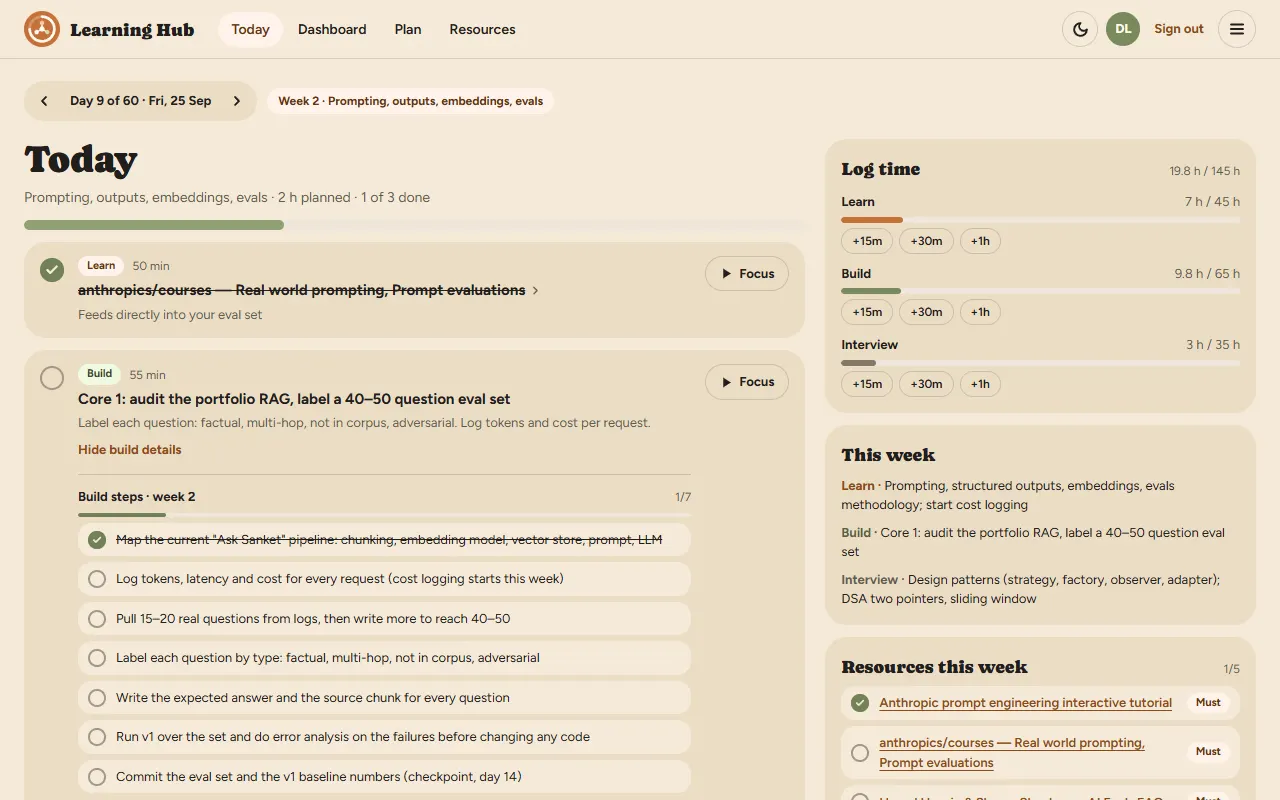
The Today screen on day 9 of 60: week 2's theme, a learn block already ticked, the build block with its seven build steps, and a side column for logging time against 45, 65 and 35 hour budgets, this week's tracks and this week's resources
Demo mode, seeded with nine days of sample progress.

Open it and it says what to do

  • Day 9 of 60, the week’s theme, and today’s blocks with their minutes. Step back and forward through any day.
  • Focus runs a timer on a block. When it ends, the hours are logged and the block can be ticked for you.
  • Build steps for the week, tickable, with reference links.
  • Log time in 15-minute taps against the track budgets.
  • This week’s resources, with Must and Recommended tags.
  • A daily capture note. Days 55 and 56 get their own rest and race screens.
06Tour · Dashboard and Plan

All sixty days on one screen
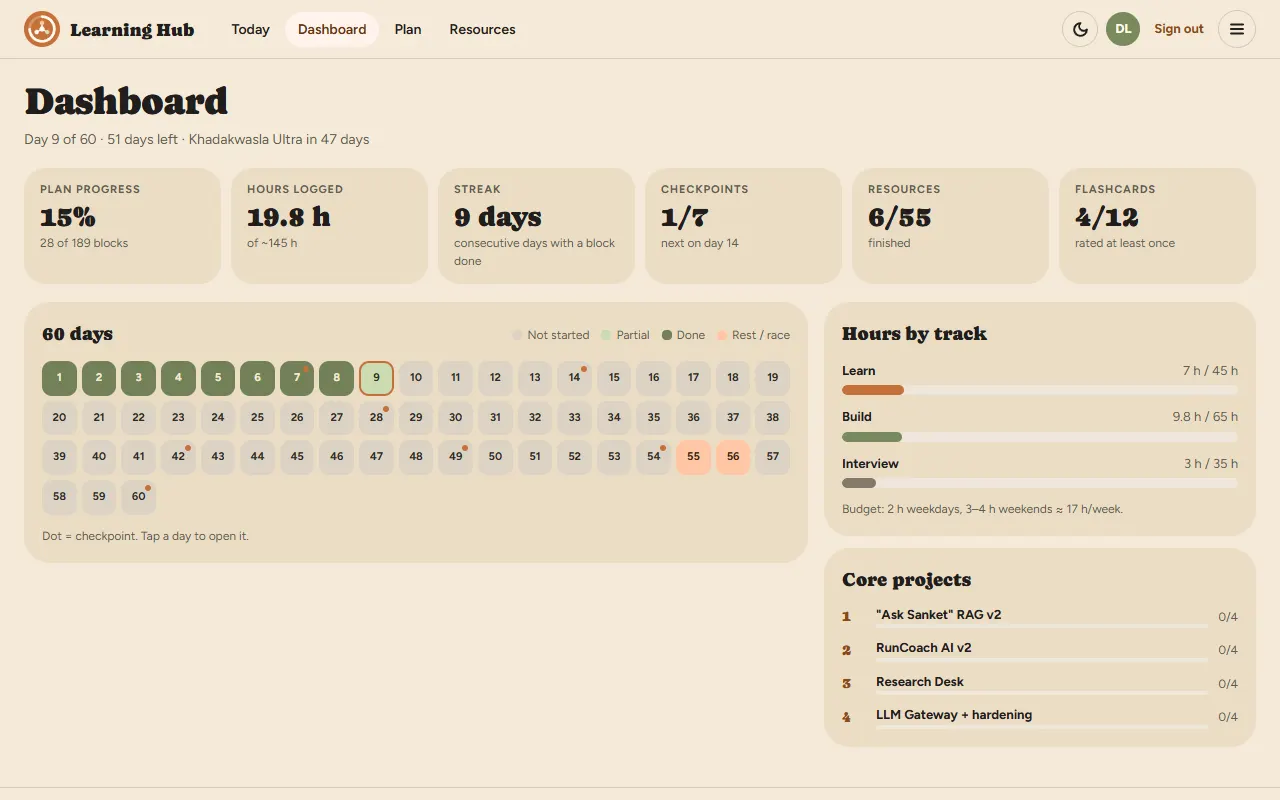
The Dashboard: 15% plan progress, 19.8 hours logged, a 9-day streak, 1 of 7 checkpoints, 6 of 55 resources and 4 of 12 flashcards; a 60-day grid with days 1 to 8 done; hours by track; the four core projects
Dashboard. Progress, hours, streak, checkpoints, resources and flashcards; a 60-day grid with checkpoint dots; hours by track; the four core projects.
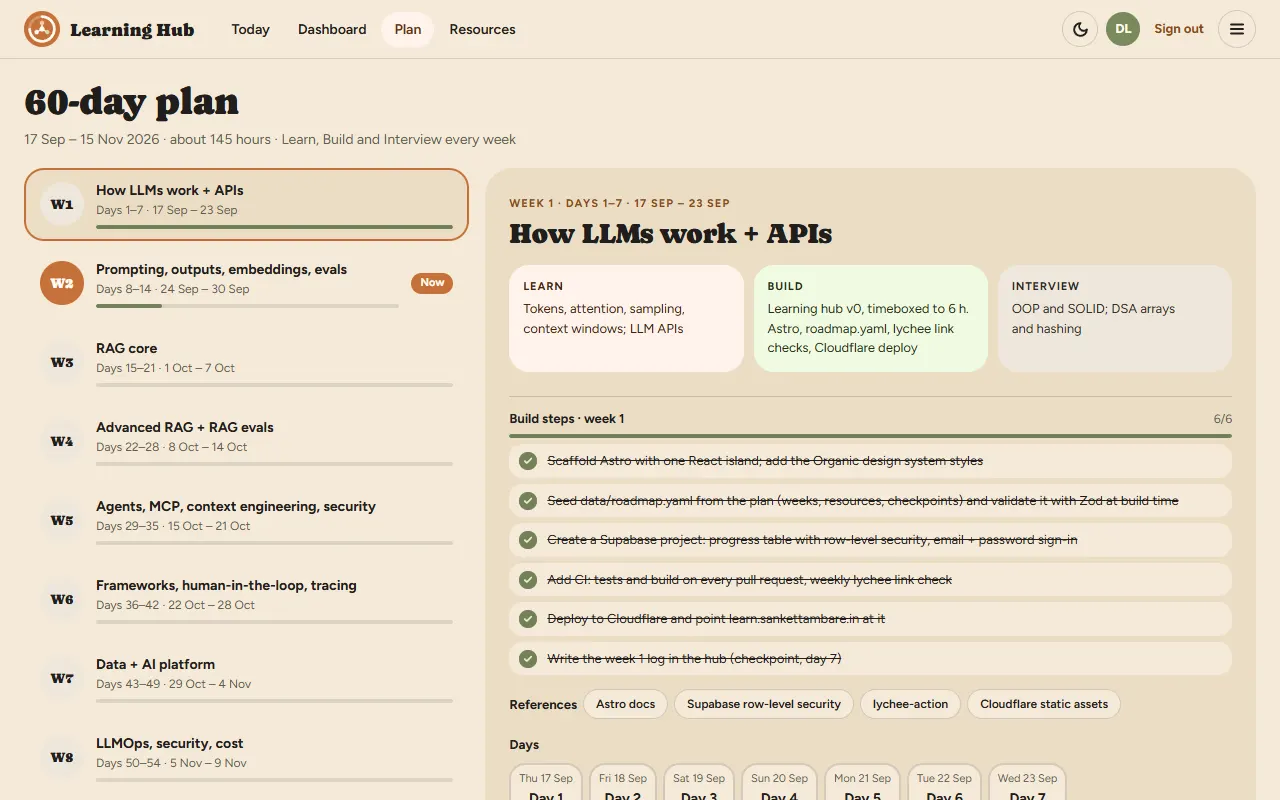
The Plan screen: a list of weeks W1 to W8 with progress bars, and week 1 open on the right with its learn, build and interview tracks, six ticked build steps, references and its days
Plan. Every week’s learn, build and interview, its build steps, references and days. Dates follow each user’s own start date.
07Tour · Resources and Projects

55 resources, four projects
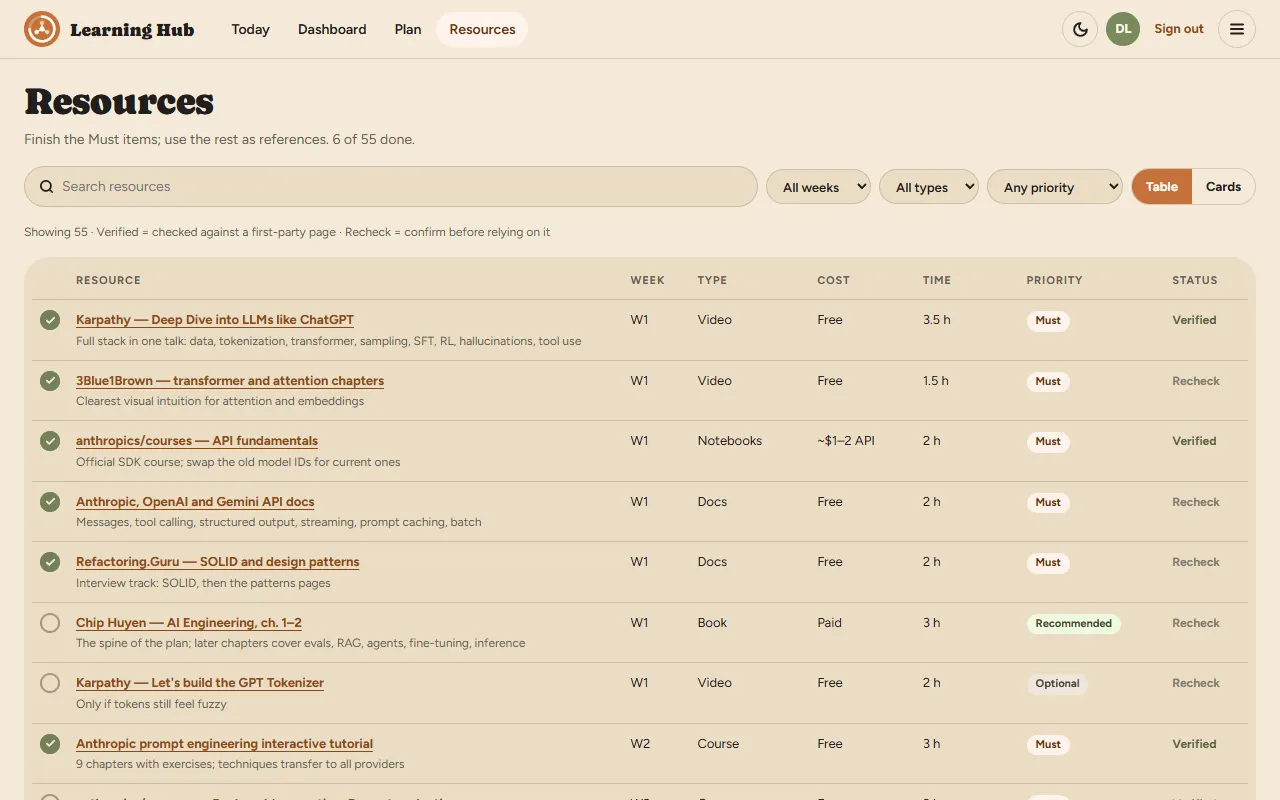
The Resources library as a table: search, week, type and priority filters; rows with week, type, cost, time, a priority tag and a Verified or Recheck status
Resources. Search and filter by week, type and priority, as a table or cards. Verified means checked against a first-party page; Recheck means confirm before relying on it.
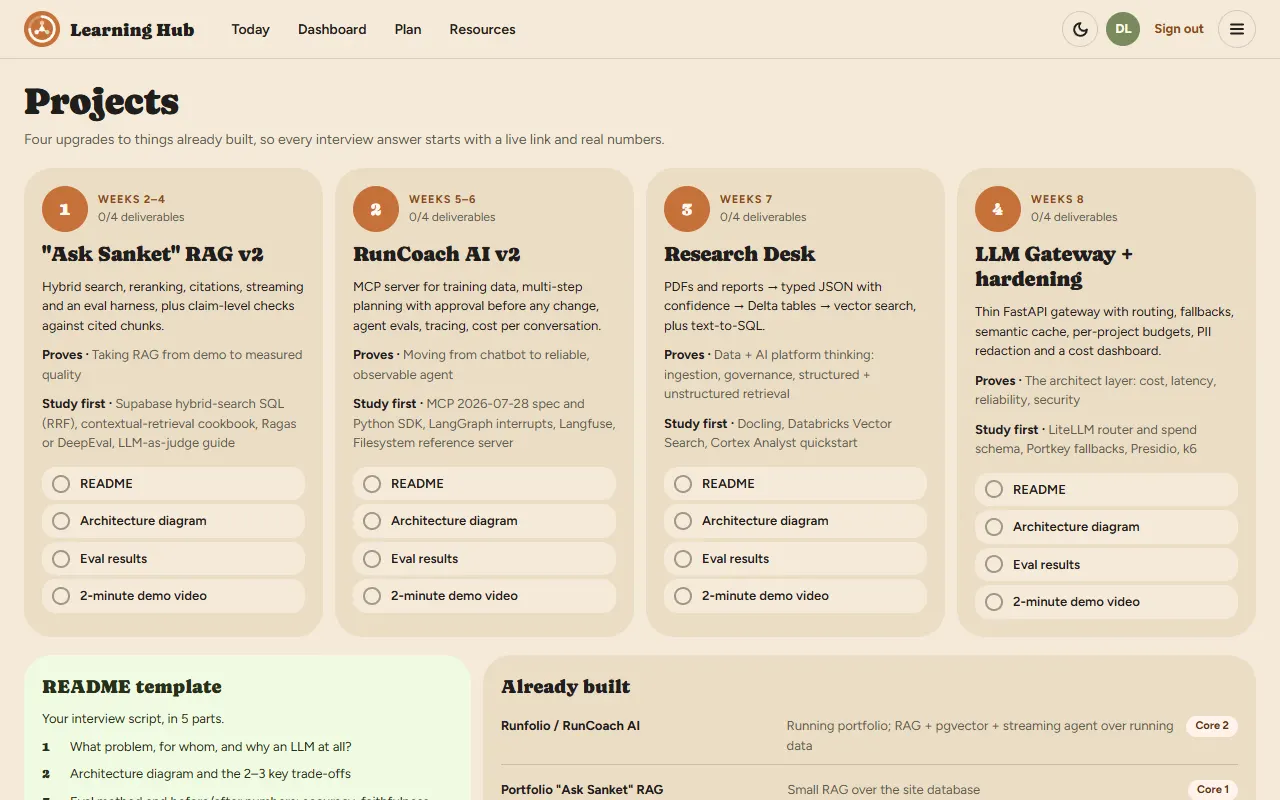
The Projects screen: four numbered cards, Ask Sanket RAG v2, RunCoach AI v2, Research Desk and LLM Gateway plus hardening, each with what it proves, what to study first and four deliverables to tick
Projects. Four upgrades to things already built, each with a README, an architecture diagram, eval results and a 2-minute demo to tick off. Below: a README template and verdicts on seven other ideas.
08Tour · Interview and the rest
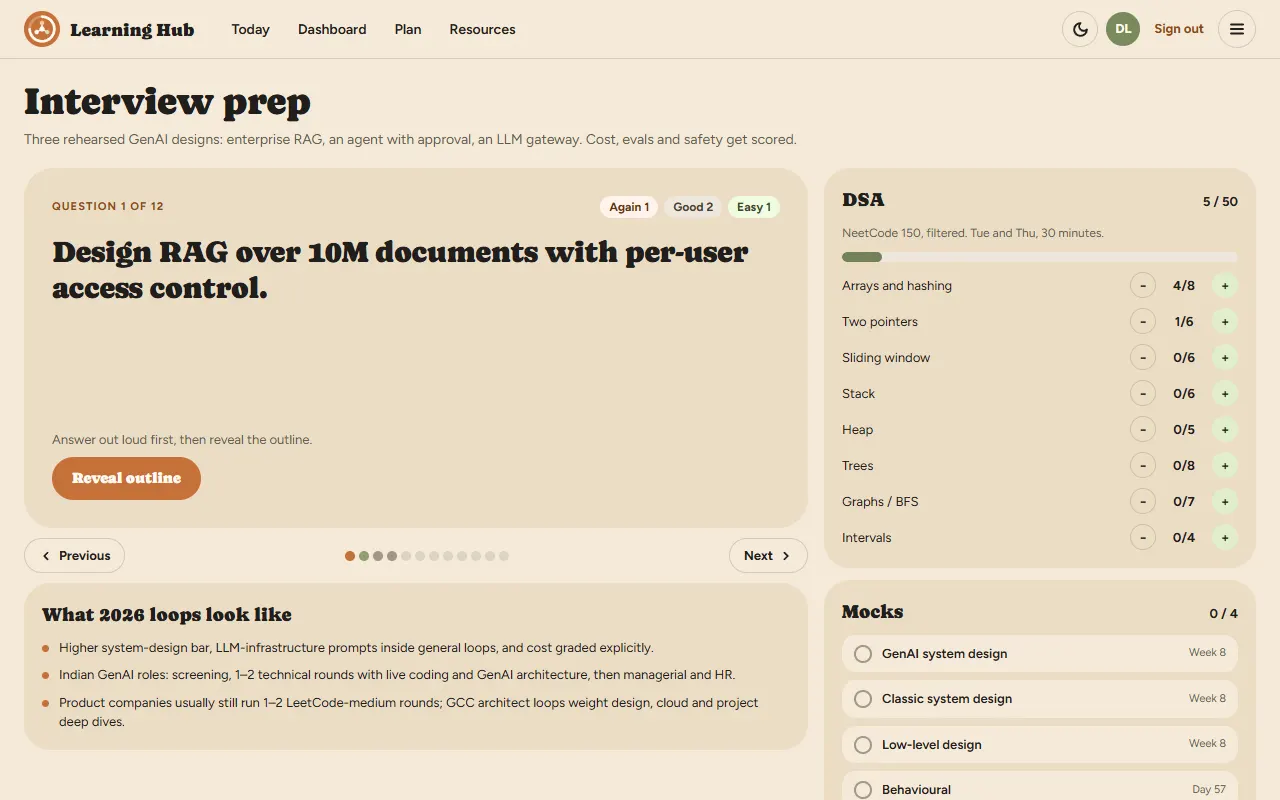
Interview prep: a flashcard asking to design RAG over 10 million documents with per-user access control, with again, good and easy counts; DSA counters for eight topics; four mocks
Interview prep. 12 flashcards with outlines and again/good/easy ratings, DSA counters for 8 topics, 4 mocks.

Prep, next to the work

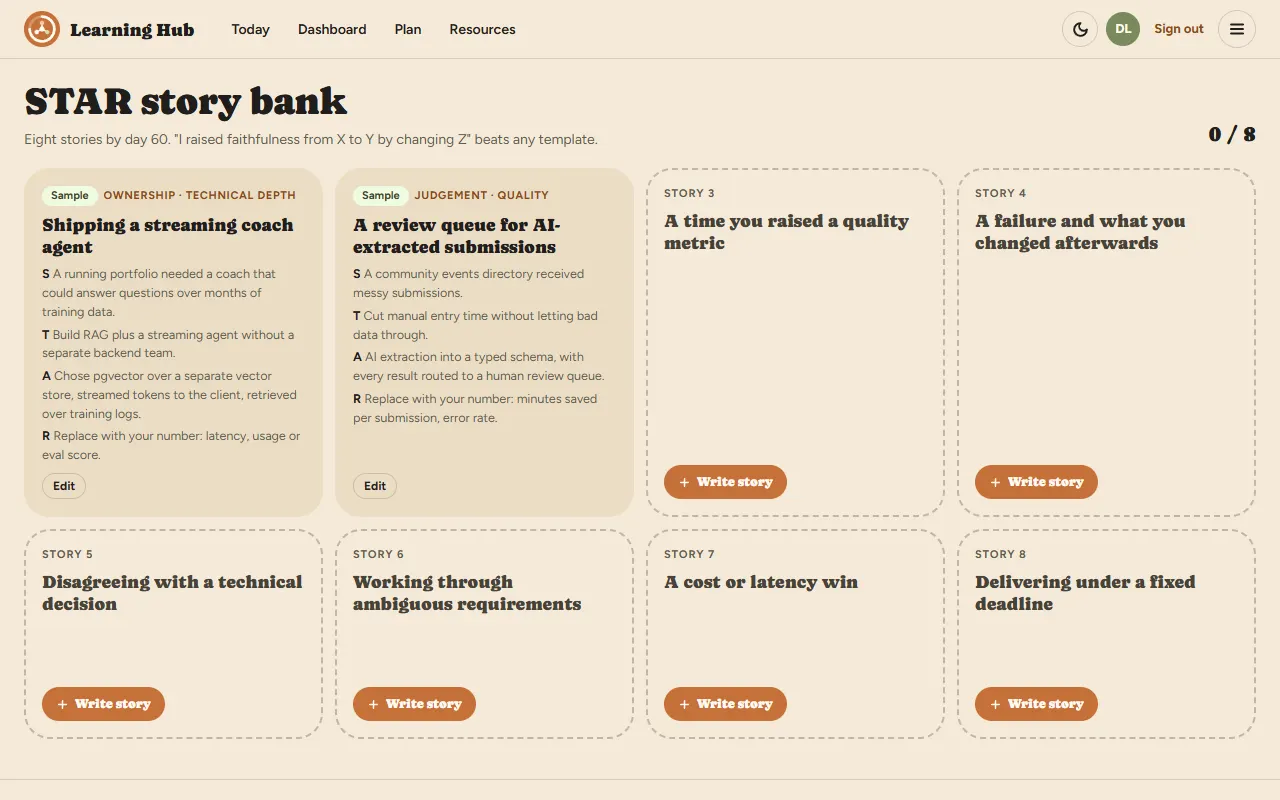
STAR stories: eight slots, two filled with samples
STAR stories: 8 slots, 2 samples
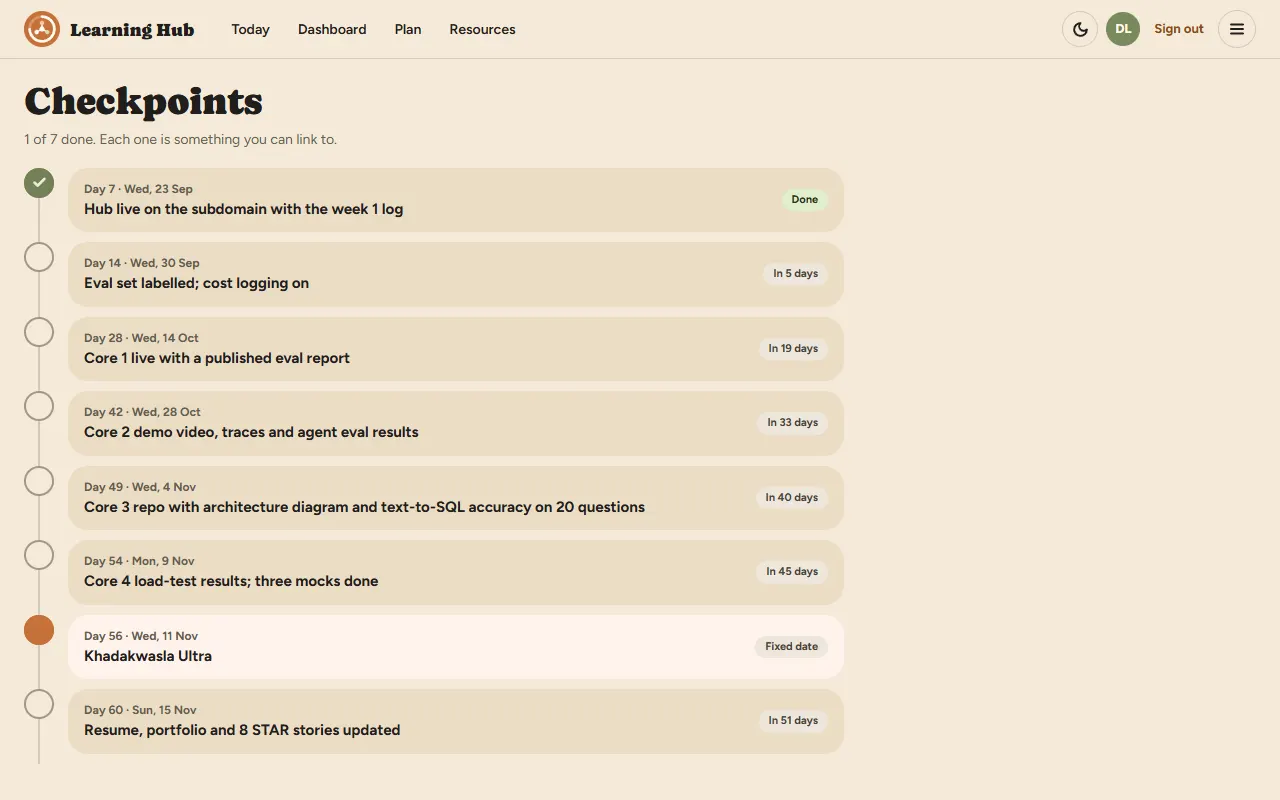
Checkpoints: a timeline of seven dated milestones, the first one done
Checkpoints: 7 on a timeline
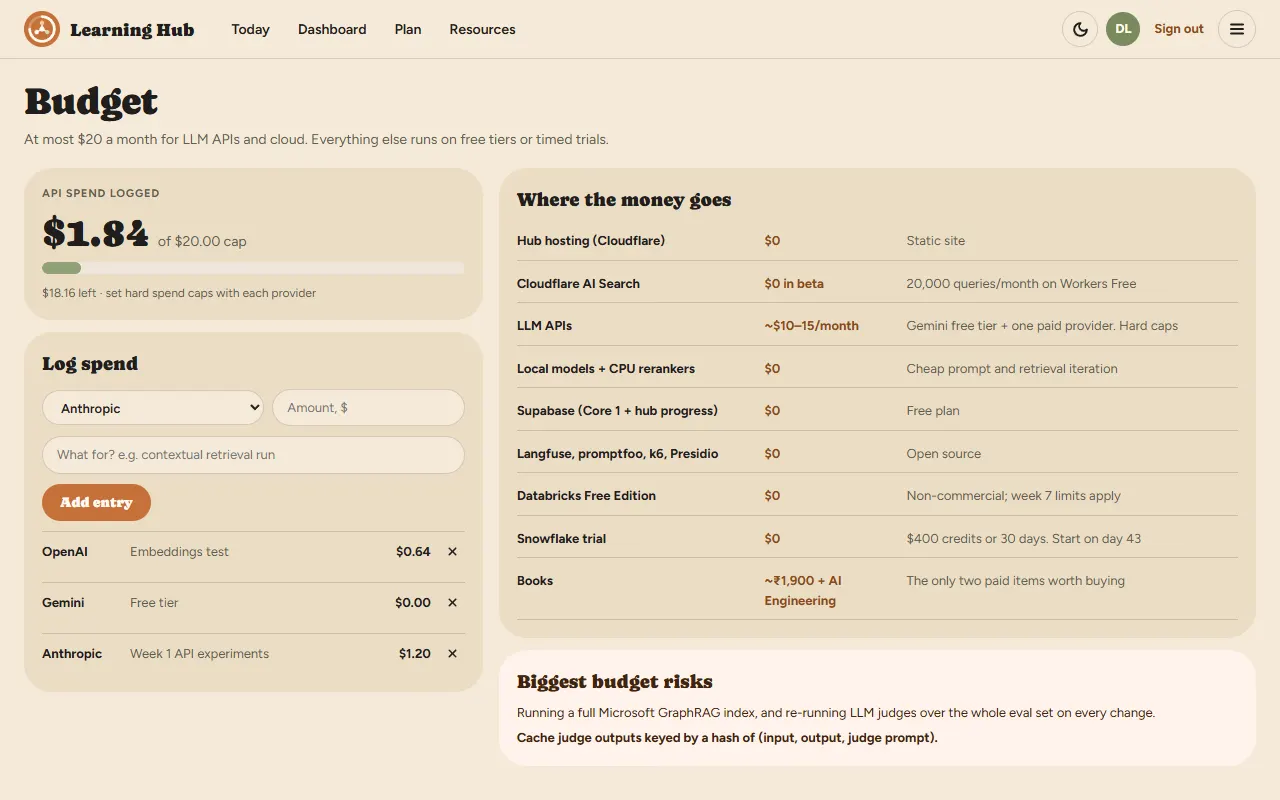
Budget: $1.84 of API spend logged against a $20 cap, a spend log and a table of where the money goes
Budget: spend against $20
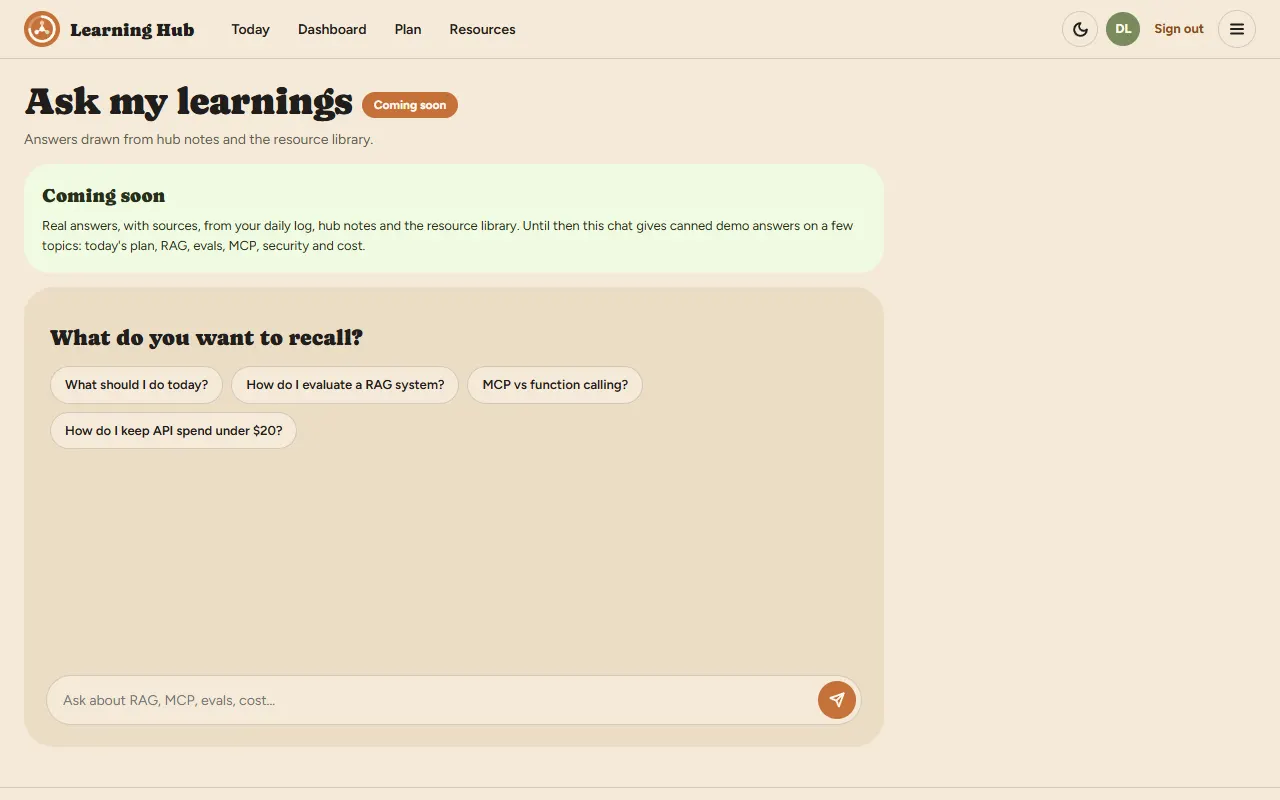
Ask my learnings, marked coming soon, with suggested questions and a chat box
Ask my learnings: coming soon

14 screens in five groups. The header keeps four; the menu has them all.

Plan Today · Dashboard · Plan · Checkpoints Learn and build Resources · Projects · Daily log · Budget Interview Interview prep · STAR stories Explore Ecosystem · Ask my learnings About About · Created by
09Three ways in

Browse, try the demo, or sign in

Browse

The whole plan is public. No account needed to read every week, resource and project.

Demo

“Continue as demo” saves progress in localStorage on this device. A fork without Supabase still gets a working tracker.

Signed in

Email and password through Supabase. Sign-up signs you straight in, and progress follows you across devices.
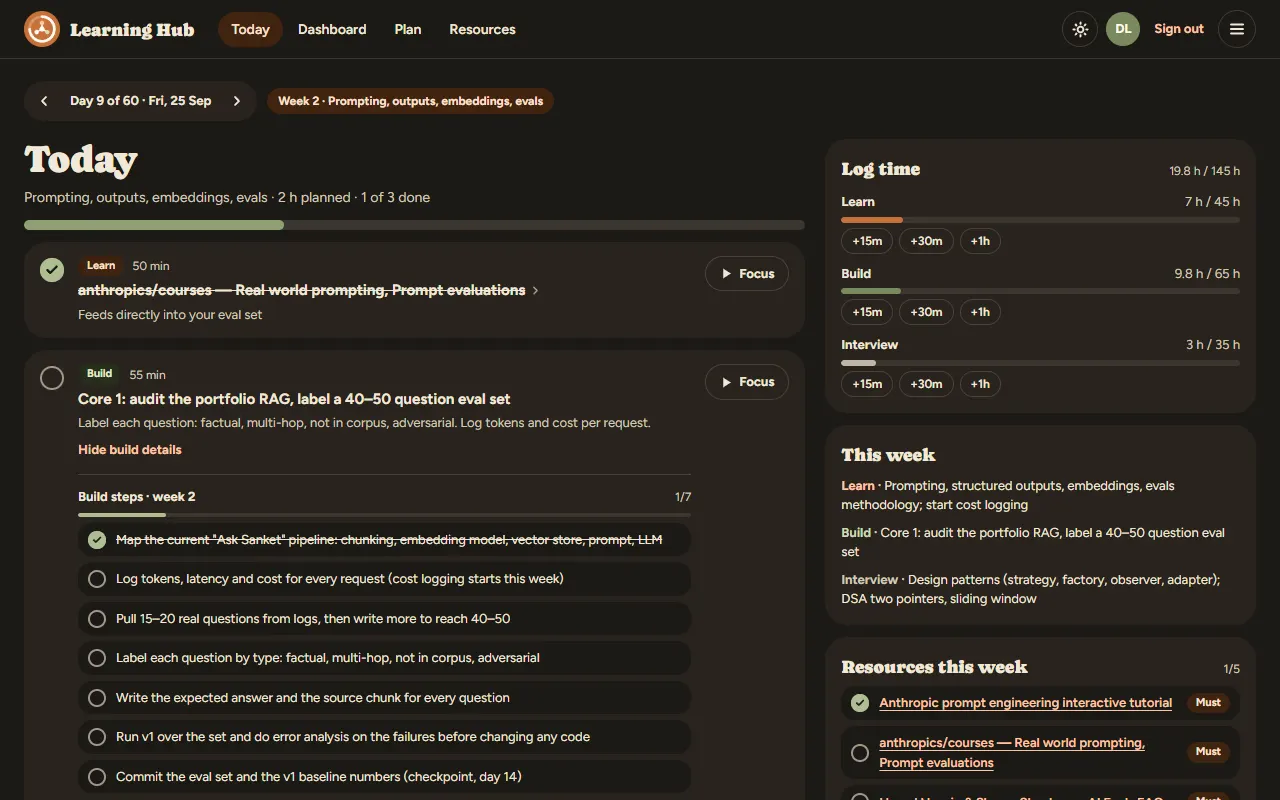
The Today screen in dark mode on day 9, in demo mode
Dark mode, remembered per device. Settings change your start date, restart from today, or skip the race days.
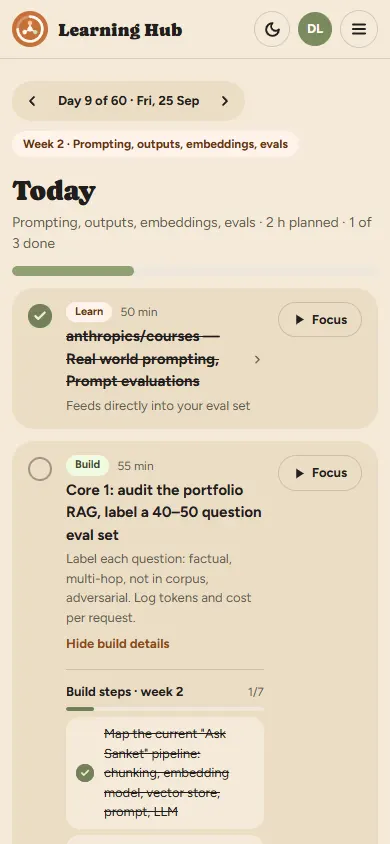
The Today screen on a 390 pixel wide phone: day 9 of 60, the week chip, and the learn and build blocks stacked in one column
At phone width, one column. Layout switches are CSS media queries, not JavaScript.
10Build · Design first

Read the design, then pick the stack

The plan had picked Astro Starlight, a docs framework, before any design existed. The Claude Design export turned out to be a 12-screen interactive app with no docs pages at all.

  • Astro 7 static site with one React 19 island: index.astro mounts App.tsx, and each screen is one file.
  • The design’s inline styles became tokens in organic.css and classes in hub.css.
  • support.js in the export is the Claude Design runtime, not app code. The logic was ported; the runtime was not shipped.
  • Sign-in changed too: GitHub OAuth gave way to email and password.

v0 went in on 25 September 2026, three days before day 1, and is live at learn.sankettambare.in.

design export 12 screens 0 docs pages Starlight: not needed docs kit
11Build · Content as data

One file holds the plan

data/roadmap.yaml is the only source of plan content: 1,065 lines covering ten phases, 55 resources, four projects, seven checkpoints, 12 flashcards, eight DSA topics, four mocks, costs and ecosystem notes.

weeks:
  - id: w1            # never changes once published
    number: 1
    start: 1
    end: 7
    title: How LLMs work + APIs
    learn: Tokens, attention, sampling, …
    build: Learning hub v0, timeboxed to 6 h
    interview: OOP and SOLID; DSA arrays and hashing
    build_steps:
      - Scaffold Astro with one React island; …
    build_links:
      - { label: Astro docs, url: "https://docs.astro.build" }

Rules the file keeps

  • Ids never change. Saved progress points at them with no foreign key. Task ids are d{day}-{index}, made by plan.ts.
  • Append build steps at the end, so saved ticks keep matching.
  • verified_on only after checking a first-party page.
  • license: link-only resources are linked, never copied.
  • Personal progress never goes in git.

Zod parses the file at build time in roadmap.ts. Break one field and npm test fails before anything deploys.

12Build · Where progress lives

One flat map, two backends

Every checkbox, note, story, spend entry and hours entry is one row: kind:item_id → JSON value. The same shape works in localStorage and in Postgres.

create table public.progress (
  user_id uuid default auth.uid(),
  kind    text check (kind in ('task', 'note', …)),
  item_id text,
  value   jsonb,
  primary key (user_id, kind, item_id)
);
create policy "Users read own progress" …
  using ((select auth.uid()) = user_id);
  • One row per item, so two devices never overwrite each other’s work.
  • Writes are optimistic and revert on failure. Hours and spend are append-only.
  • A trigger caps each user at 5,000 rows. Sixty heavy days is about 1,500.
  • rls_check.sql proves user B sees none of user A’s rows.
RLS signed in: Supabase demo: localStorage same key either way 12 kinds of row: task · resource · note · star spend · hours · setting · … task:d9-0 → true
the hub fork yours edit one file roadmap.yaml
13Build · Shipping and forking

Fork it, edit one file, deploy

  • Edit data/roadmap.yaml: your weeks, resources, start date and budget cap; author fills the Created by page.
  • Supabase is optional. Add PUBLIC_SUPABASE_URL and PUBLIC_SUPABASE_PUBLISHABLE_KEY for accounts; without them the fork runs in demo mode.
  • Push. Cloudflare’s git integration builds the static dist/. Hosting costs $0.

CI

Tests and build on every pull request.

Links

Weekly lychee check; a broken link opens an issue.

Licence

Code MIT, notes CC BY 4.0.

14From docs/lessons.md

Six things that cost time

Stack before design

Starlight was chosen before the design arrived, then dropped for a React island. Get the design first.

PGRST205

Sign-in worked but loading failed: auth was ready before the progress table existed. The app now names the missing migration.

A quiet deadlock

Calling Supabase inside onAuthStateChange can deadlock. Defer the call with setTimeout(…, 0).

1,000 rows per request

PostgREST returns at most 1,000 rows by default, so load() pages with .range().

npm 10 on Cloudflare

A lockfile written by npm 11 failed npm ci there. Regenerate with npx npm@10.9.2 install --package-lock-only.

YAML commas

In flow style, { cost: ~₹1,900 } splits at the comma. Quote such values.

15Next

Day 1 is 28 September

Ask my learnings, for real

Cloudflare AI Search over roadmap.yaml, the plan and future notes, behind a small Worker at /api/ask that answers with source chips. Guardrails: a per-IP rate limit, a question length cap, a hard monthly spend cap, and retrieved text treated as data. It doubles as a small RAG project.

Backlog

  • Import demo progress into Supabase on first sign-in
  • Flag resources not verified in 90 days
  • Markdown notes, and a public read-only progress page
Open Learning Hub ↗ Checkpoint 1: hub live by day 7, 4 October
day 60 start · day 1 · 28 Sep